
CCT - getCCIPAdmin() token with Lock and Release Pool in forked environments
This tutorial walks you through testing the Lock & Release flow for enabling your own tokens in CCIP 2.0, using the CCIP Foundry Starter Kit's Example 07 (CCT 02). You will deploy a CrossChainToken (a CCT-compatible ERC-20 that exposes getCCIPAdmin()) with an ERC20LockBox and a Lock & Release pool on forks of Ethereum Sepolia and Polygon Amoy, fund the destination lock box with liquidity, and send a transfer across the CCIP 2.0 lane with CCIPLocalSimulatorFork routing the message.
The kit runs this exact flow as a fork test (test/fork/Example07.fork.t.sol), so every step below is verified against pinned forks of the live testnets.
Prerequisites
Before we start with this guide, let's recap parts of the CCT standard that we will need for it.
Requirements for Cross-Chain Tokens
Before enabling an ERC20-compatible token in CCIP, it's important to understand the requirements it must fulfill to integrate with CCIP.
-
Recommended permissionless token administrator address registration methods: A token can use either of these supported function signatures to register permissionlessly:
-
owner(): This function returns the token contract owner's address. -
getCCIPAdmin(): This function returns the token administrator's address and is recommended for new tokens, as it allows for abstraction of the CCIP Token Administrator role from other common roles, likeowner().
-
-
Requirements for CCIP token transfers: The token's smart contract must meet minimum requirements to integrate with CCIP.
- Lock & Release Requirements:
- The token smart contract must have the following functions:
decimals(): Returns the token's number of decimals.balanceOf(address account): Returns the current token balance of the specifiedaccount.
- On the destination blockchain, the token contract must support granting mint and burn permissions. The token developers or another role (such as the token administrator) will grant these permissions to the token pool.
- The token smart contract must have the following functions:
- Lock & Release Requirements:
In the Lock & Release flow, the source pool locks the tokens in its lock box and the destination pool releases tokens from its own lock box liquidity. Nothing is burned or minted: the total supply stays constant on every chain, and the destination lock box must hold enough liquidity before a transfer can execute.
Understanding the Procedure
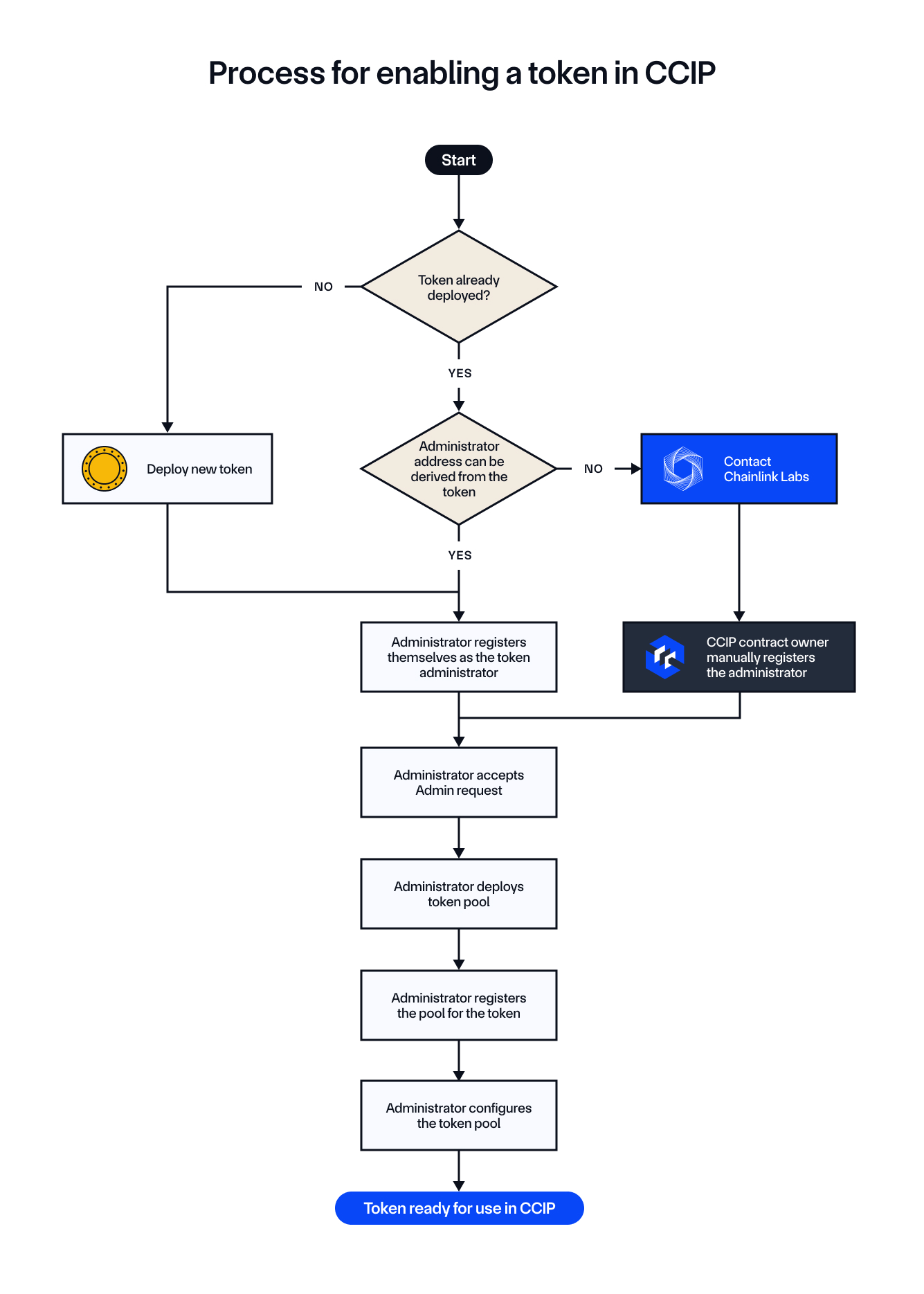
It is also important first to understand the overall procedure for enabling your tokens in CCIP. This procedure involves deploying tokens and token pools, registering administrative roles, and configuring token pools to enable secure token transfers using CCIP. The steps in the diagram below highlight the flow of actions needed to enable a token for cross-chain transfers. Whether you're working with an Externally Owned Account (EOA) or a Smart Account (such as one using a multisig scheme), the overall logic remains the same. You'll follow the same process to enable cross-chain token transfers, configure pools, and register administrative roles.
The diagram below outlines the entire process:
Before You Begin
Complete the CCT burn and mint tutorial prerequisites: clone the kit, initialize the submodules, set ETHEREUM_SEPOLIA_RPC_URL and POLYGON_AMOY_RPC_URL in .env, and import a keystore account (cast wallet import myAccount --interactive). This tutorial assumes --account myAccount and FOUNDRY_PROFILE=cct for the deployment commands.
Step 1: Deploy the token, lock box and pool on Ethereum Sepolia (source)
Run the DeployCCTLockReleaseTokenAndPool script. It deploys the CrossChainToken (name TestToken, symbol TEST, 18 decimals, 1_000_000e18 pre-mint to the broadcaster, 100_000_000e18 max supply), the ERC20LockBox, and the Lock & Release pool (wired to the lock box), authorizes the pool as a lock box caller, registers the token admin via getCCIPAdmin(), accepts the admin role, and sets the pool in the TokenAdminRegistry:
FOUNDRY_PROFILE=cct forge script script/examples/Example07.s.sol:DeployCCTLockReleaseTokenAndPool \
  --rpc-url ethereumSepolia \
  --account myAccount \
  --broadcast \
  --sig "run(address,address,address,address)" \
  <SEPOLIA_TOKEN_ADMIN_REGISTRY> \
  <SEPOLIA_REGISTRY_MODULE_OWNER_CUSTOM> \
  <SEPOLIA_ARM_PROXY> \
  <SEPOLIA_ROUTER>
Read the four addresses from the CCIP Directory. Save from the logs:
<SEPOLIA_TOKEN_ADDRESS><SEPOLIA_LOCKBOX_ADDRESS><SEPOLIA_POOL_ADDRESS>
Step 2: Deploy the token, lock box and pool on Polygon Amoy (destination)
FOUNDRY_PROFILE=cct forge script script/examples/Example07.s.sol:DeployCCTLockReleaseTokenAndPool \
  --rpc-url polygonAmoy \
  --account myAccount \
  --broadcast \
  --sig "run(address,address,address,address)" \
  <AMOY_TOKEN_ADMIN_REGISTRY> \
  <AMOY_REGISTRY_MODULE_OWNER_CUSTOM> \
  <AMOY_ARM_PROXY> \
  <AMOY_ROUTER>
Save <AMOY_TOKEN_ADDRESS>, <AMOY_LOCKBOX_ADDRESS> and <AMOY_POOL_ADDRESS>.
Step 3: Configure each pool with the other chain as its remote
The Example07 script links a pool to its remote chain (remote token, remote pool, disabled rate limiter in this example). Run it on both chains:
FOUNDRY_PROFILE=cct forge script script/examples/Example07.s.sol:Example07 \
  --rpc-url ethereumSepolia \
  --account myAccount \
  --broadcast \
  --sig "run(address,uint64,address,address)" \
  <SEPOLIA_POOL_ADDRESS> \
  <AMOY_CHAIN_SELECTOR> \
  <AMOY_TOKEN_ADDRESS> \
  <AMOY_POOL_ADDRESS>
FOUNDRY_PROFILE=cct forge script script/examples/Example07.s.sol:Example07 \
  --rpc-url polygonAmoy \
  --account myAccount \
  --broadcast \
  --sig "run(address,uint64,address,address)" \
  <AMOY_POOL_ADDRESS> \
  <SEPOLIA_CHAIN_SELECTOR> \
  <SEPOLIA_TOKEN_ADDRESS> \
  <SEPOLIA_POOL_ADDRESS>
Step 4: Fund the destination lock box with liquidity
Before a Sepolia → Amoy transfer can execute, the Amoy lock box must hold tokens to release. Fund it with the FundCCTLockBoxLiquidity script:
FOUNDRY_PROFILE=cct forge script script/examples/Example07.s.sol:FundCCTLockBoxLiquidity \
  --rpc-url polygonAmoy \
  --account myAccount \
  --broadcast \
  --sig "run(address,address,uint256)" \
  <AMOY_TOKEN_ADDRESS> \
  <AMOY_LOCKBOX_ADDRESS> \
  <DESTINATION_LIQUIDITY>
Step 5: Send the transfer across the lane
Send with default finality using the shared CCT sender script:
FOUNDRY_PROFILE=cct forge script script/examples/Example06.s.sol:SendCCTTokenWithExtraArgsV3DefaultFinality \
  --rpc-url ethereumSepolia \
  --account myAccount \
  --broadcast \
  --sig "run(address,uint64,address,address,uint256,uint32,address)" \
  <SEPOLIA_ROUTER> \
  <AMOY_CHAIN_SELECTOR> \
  <RECEIVER_ON_AMOY> \
  <SEPOLIA_TOKEN_ADDRESS> \
  <AMOUNT> \
  <GAS_LIMIT> \
  <FEE_TOKEN_ADDRESS>
<GAS_LIMIT>: set to0for a token-only transfer to an EOA receiver.<FEE_TOKEN_ADDRESS>: the LINK token address on Sepolia to pay in LINK, or0x0000000000000000000000000000000000000000to pay in native.
The script logs the message ID. Monitor the message on CCIP Explorer.
Run the same flow as a fork test
The kit's test/fork/Example07.fork.t.sol runs this entire procedure against pinned forks of the live testnets. The core of the test:
// Deploy on both forks through the real script
(sepoliaToken, sepoliaLockBox, sepoliaPool) = _deploy(sepoliaFork, sepolia);
(amoyToken, amoyLockBox, amoyPool) = _deploy(amoyFork, amoy);

// Link the pools through the real script
vm.selectFork(sepoliaFork);
configureLaneScript.run(sepoliaPool, amoy.chainSelector, amoyToken, amoyPool);
vm.selectFork(amoyFork);
configureLaneScript.run(amoyPool, sepolia.chainSelector, sepoliaToken, sepoliaPool);

// Fund the destination lock box first
vm.selectFork(amoyFork);
fundLockBoxScript.run(amoyToken, amoyLockBox, DESTINATION_LIQUIDITY);

// Send on Sepolia and route to the Amoy OffRamp
_sendDefaultFinalityAndRoute(sepoliaToken, TRANSFER_AMOUNT);

// Lock & Release: supply is unchanged on both chains
assertEq(_balanceOnFork(sepoliaFork, sepoliaToken, sepoliaLockBox), TRANSFER_AMOUNT);
assertEq(_supplyOnFork(sepoliaFork, sepoliaToken), PREMINT);
assertEq(_balanceOnFork(amoyFork, amoyToken, receiver), TRANSFER_AMOUNT);
assertEq(_balanceOnFork(amoyFork, amoyToken, amoyLockBox), DESTINATION_LIQUIDITY - TRANSFER_AMOUNT);
assertEq(_supplyOnFork(amoyFork, amoyToken), PREMINT);
Run it with:
FOUNDRY_PROFILE=fork forge test --match-contract Example07ForkTest -j 1
The fork test also asserts the empty-lock-box failure: it sends without funding the Amoy lock box and expects the routing call to revert with CCIPLocalSimulatorFork__MessageExecutionFailed, which is the strict-routing surface of the destination OffRamp's recorded failure.
Verify the result on the live testnets
After the transfer finalizes, verify the registration, the lane mapping and the Lock & Release behavior:
cast call <SEPOLIA_TOKEN_ADMIN_REGISTRY> "getPool(address)(address)" <SEPOLIA_TOKEN_ADDRESS> --rpc-url ethereumSepolia
cast call <SEPOLIA_POOL_ADDRESS> "getRemoteToken(uint64)(bytes)" <AMOY_CHAIN_SELECTOR> --rpc-url ethereumSepolia
cast call <SEPOLIA_LOCKBOX_ADDRESS> "balanceOf(address)(uint256)" <SEPOLIA_LOCKBOX_ADDRESS> --rpc-url ethereumSepolia
cast call <AMOY_TOKEN_ADDRESS> "balanceOf(address)(uint256)" <RECEIVER_ON_AMOY> --rpc-url polygonAmoy
cast call <AMOY_LOCKBOX_ADDRESS> "balanceOf(address)(uint256)" <AMOY_LOCKBOX_ADDRESS> --rpc-url polygonAmoy
The total supply on each chain is unchanged: nothing was burned or minted.
Next steps
- For the Burn & Mint flow, read the CCT burn and mint tutorial.
- For pool hooks, pool-based CCVs and policy engines, see the kit's Examples 08-10 (
AdvancedPoolHooks). - For the full CCT registration procedure against live testnets (not forks), read Register a new Lock and Mint token from an EOA.